 Ringbook
Personal finance with Ringbook
Keep one set of books for your income, spending, savings and debts, so you can see both where your money went and what you are worth. You do not need to know any accounting to start.
Two reports, one set of books
Most budgeting apps sort your spending into categories. That tells you where money went, but not what you own or owe. Ringbook uses the same double-entry method as a business, so one set of entries answers both questions.
| Question | Report | What it shows | Example |
|---|---|---|---|
| Did I earn more than I spent this month? | Profit & Loss | Income minus expenses over a period. | Salary is income. Rent and dinners are expenses. |
| What am I worth today? | Balance Sheet | What you own, minus what you owe, on a date. The result is your net worth. | Bank and savings are what you own. A credit card balance is what you owe. |
Record each transaction once and both reports move together. Create an organization for your household and choose your home currency as the base currency; the Getting Started guide shows how. The base currency cannot be changed later.
Set up your books
Setup has three parts: your spending categories, how the AI uses them, and the position you start from.
Make the categories yours
Open the Chart of Accounts and rename the expense accounts to match your life. You can be as detailed as you like: Movies, Dinner, Coffee, Gym, Gifts, or Clothes for fun and Clothes for work as separate accounts.
Let the AI sort your spending
Ringbook's AI reads a description and files each transaction under one of your accounts. It can read two kinds of description:
- What you wrote: the note on a Ring when you photograph a receipt or log a spend.
- What the bank wrote: the text on a bank or card statement line.
"Uniqlo, work shirts" goes to Clothes for work. "AMC tickets" goes to Movies. "Izakaya with Ken" goes to Dinner. You review each suggestion before it is booked.
Set your opening balances
Tell Ringbook where you start with one entry, dated on the day you begin. It uses a Capital account to hold your net worth at the start.
Here is an example in HKD. You have 45,000 in a bank account, 80,000 in savings, and you owe 6,200 on a credit card.
| Account | Debit | Credit |
|---|---|---|
| Bank | 45,000.00 | |
| Savings | 80,000.00 | |
| Credit Card | 6,200.00 | |
| Capital | 118,800.00 | |
| Total | 125,000.00 | 125,000.00 |
Capital is 118,800 because that is what you would keep if you cashed in everything and paid off the card: 45,000 + 80,000 − 6,200. Ringbook shows a running Difference while you enter lines, and it will not post an unbalanced entry.
Debits and credits in plain words
Every transaction has two sides, because money always comes from somewhere and goes somewhere. Debit and credit are the names for the left and right side of an entry. Neither means good or bad.
What matters is which one makes an account's balance grow:
| Account type | Examples | A debit | A credit |
|---|---|---|---|
| Asset (what you own) | Bank, Savings, Cash, money a friend owes you | Increases it | Decreases it |
| Liability (what you owe) | Credit Card, Loan | Decreases it | Increases it |
| Capital | Capital | Decreases it | Increases it |
| Income | Salary Income | Decreases it | Increases it |
| Expense | Rent, Dinner, Groceries | Increases it | Decreases it |
Two questions for every transaction
You do not need to memorize that table. Ask one of these two questions and the entry follows.
| Money | Ask | If no | If yes |
|---|---|---|---|
| Comes in | Do I have to pay it back? | It is income (salary, interest, a refund). Debit Bank, credit Income. Net worth goes up. | It is a liability (a loan). Debit Bank, credit Loan. Net worth does not change, because you owe it. |
| Goes out | Can I get it back? | It is an expense (rent, dinner). Debit the expense, credit Bank. Net worth goes down. | It is an asset (you lent 300 to a friend). Debit Receivable, credit Bank. Net worth does not change. |
Two more cases never touch income or spending. Moving money between your own accounts changes which asset holds it. Paying off a debt lowers the debt and your cash by the same amount.
Reading the account icons
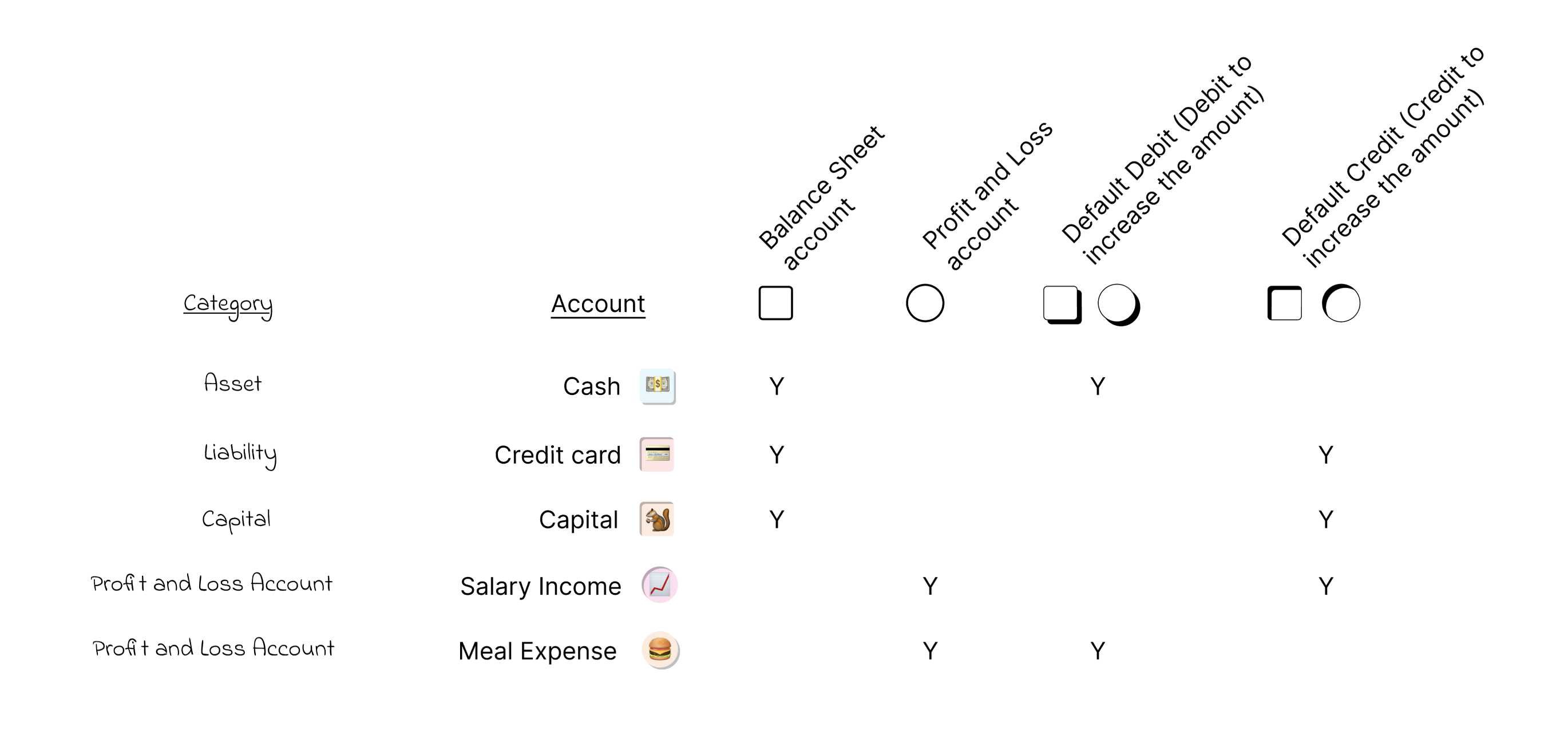
Each account has a small icon that tells you where it lives and which way it grows, so you can predict an entry without memorizing rules. The icon shows two things:
- Shape: a square is a Balance Sheet account (Assets, Liabilities, Capital). A circle is a Profit & Loss account (Income and Expenses).
- Edge: a raised edge means a debit increases the account (Assets and Expenses). A dented edge means a credit increases it (Liabilities, Capital and Income).
Reading the arrows on each line
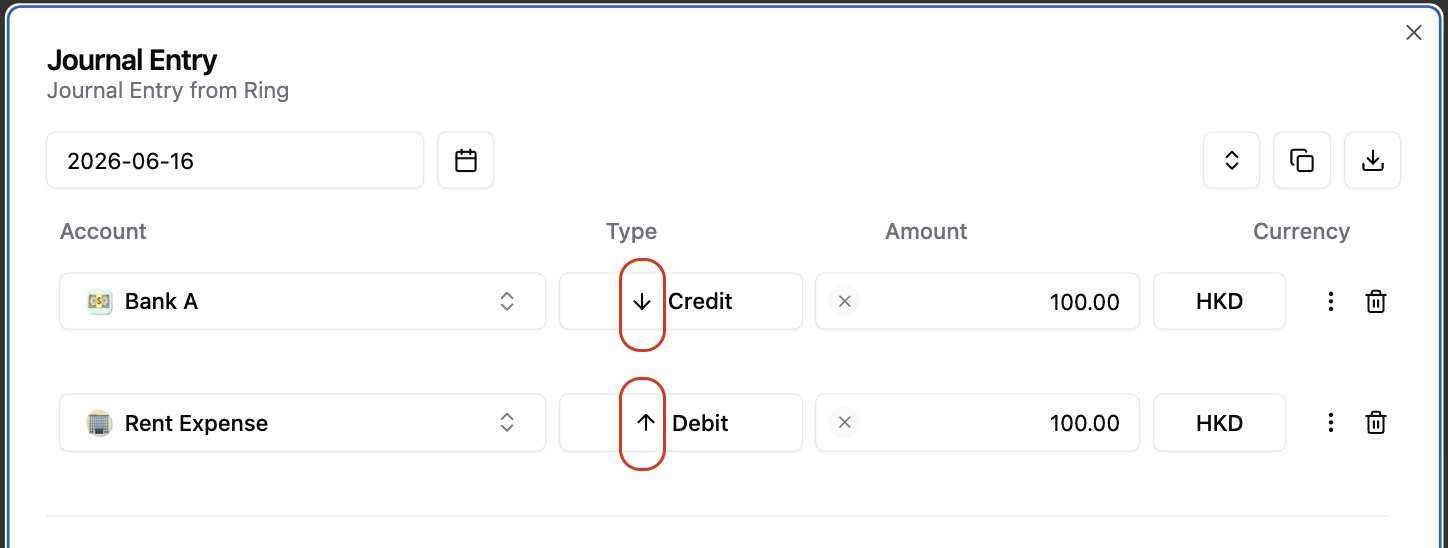
When you post an entry, an arrow beside each line shows whether it will increase or decrease that account. Ringbook works this out from the account type. In the entry below, crediting Bank A points down because the cash balance falls by 100, and debiting Rent Expense points up because the expense rises by 100.
A worked month
Start from the opening balances above and follow one month. Seven entries cover everything.
| Date | What happened | Debit | Credit | Income or spending? |
|---|---|---|---|---|
| 1 Sep | Salary of 30,000 arrives | Bank | Salary Income | Income |
| 1 Sep | Rent of 12,000 paid from the bank | Rent | Bank | Spending |
| 8 Sep | Groceries, 1,800 on the card | Groceries | Credit Card | Spending |
| 12 Sep | Dinner, 1,100 on the card | Dinner | Credit Card | Spending |
| 20 Sep | Transport, 600 on the card | Transport | Credit Card | Spending |
| 25 Sep | Card bill of 6,200 paid from the bank | Credit Card | Bank | Neither: debt and cash both fall |
| 28 Sep | 5,000 moved to savings | Savings | Bank | Neither: money changes accounts |
At the end of the month, open the two reports. They are built from the same seven entries and they agree.
Your net worth rose from 118,800 to 133,300. That is 14,500, exactly the amount you earned (30,000) minus what you spent (15,500). The salary and the spending are the only entries that change net worth. Paying the card and moving money to savings only rearrange it.
Paying a credit card bill
Paying a card bill feels like spending, but it is not an expense. The expense was recorded when you bought the groceries, dinner and train tickets. Paying the bill debits the Credit Card, which lowers what you owe, and credits Bank, which lowers your cash. Your net worth stays the same.
A budgeting app that counts the payment as spending would count the same money twice. Ringbook does not, because you asked the second question: can I get it back? Here the answer is that you have already cleared the debt.
Bring every account together with reconciliation
Most people use more than one account: a bank account, savings, a credit card or two, a wallet balance. Reconciliation combines them. Upload the statements for each one, and Reconciliation reads the transactions and suggests categories, using the same AI and the same statement descriptions. You confirm what it proposes.
It is also the quickest way to catch up. Instead of typing a month by hand, upload the statements and review the sorted lines. See the Bank Reconciliation chapter for the steps.
Dates, due dates and budgets
Keep two dates apart. The journal date is when the event belongs in your books. The Due date on a line is when a receivable, payable or other balance is expected to settle.
| Situation | What to do |
|---|---|
| Someone owes you money | Record the receivable on the date it arose and set its expected collection date in Due date. When they pay, record the bank movement and clear the receivable. |
| You owe a bill | Use the payable line's Due date for the payment deadline. Do not move the whole journal to a future date as a reminder. |
| You have an existing loan | Maintain the repayment schedule without booking the same liability twice, and do not record a payment before it happens. Ask your accountant about recognition when unsure. |
| You paid for the business personally | This can create an amount the business owes you. It is not automatically the business's own credit card liability. |
Use Maturity to review balances by date and Open Items to follow up and clear them. Use Budget for planned income and spending that has not happened yet; its Basic and Advanced Excel formats let you enter targets. Check the signs on your bank or card statement before you reconcile.
Monthly checklist
- Your organization uses your home currency as its base currency.
- Your expense categories in the Chart of Accounts match your life.
- The opening entry is posted, and Capital equals your real net worth on that day.
- Each month you upload bank, card and wallet statements to Reconciliation and confirm the AI's categories.
- For each transaction that is not income or spending, you asked: can I get it back, or do I have to pay it back?
- At month-end you review the Profit & Loss and the Balance Sheet, and check that the change in net worth equals your surplus.
FAQ
Do I need to understand double-entry to use this?
No. Ringbook builds both sides of each entry. For each transaction you decide whether it is income, an expense, a loan or something you can get back, using the two questions. In return, you get your net worth, kept current.
How detailed can my categories be?
As detailed as you want. Separate Movies from Dinner, or Clothes for fun from Clothes for work. The AI sorts by description, so more categories do not mean more work. See Make the categories yours.
How does the AI choose a category?
It reads the note you wrote or the text on the bank statement line, and matches it to your accounts. See Let the AI sort your spending.
Is paying my credit card bill an expense?
No. You debit Credit Card and credit Bank, so your debt and your cash fall by the same amount. The expense was recorded when you made the purchase. See Paying a credit card bill.
What about money I lend to a friend?
It is an asset, because you can get it back. Debit Receivable and credit Bank. When your friend repays you, debit Bank and credit Receivable.
Can Ringbook combine several banks and wallets?
Yes. Reconciliation takes statements from every bank account, credit card and wallet, and puts them in one place. See Bring every account together with Reconciliation.
Who can help me set up my books?
Email samyip@ringbook.io with your organization ID (from your profile) and a list of your accounts, and we will help you set up your opening position and categories.